
In partnership with

🌟 Special Edition: Sora 2 Has Arrived
Welcome to this special issue of AI Viewer. This isn’t our regular update — today we’re diving deep into OpenAI’s Sora 2, the breakthrough AI video model that’s making headlines worldwide.
From ultra-realistic physics to voice-synced characters, Sora 2 changes how stories, clips, and animations are created. And for our readers — we’re giving you a chance to try it first.
Typing is a thing of the past

Typeless turns your raw, unfiltered voice into beautifully polished writing - in real time.
It works like magic, feels like cheating, and allows your thoughts to flow more freely than ever before.
With Typeless, you become more creative. More inspired. And more in-tune with your own ideas.
Your voice is your strength. Typeless turns it into a superpower.
🚀 How to Get Started with Sora 2
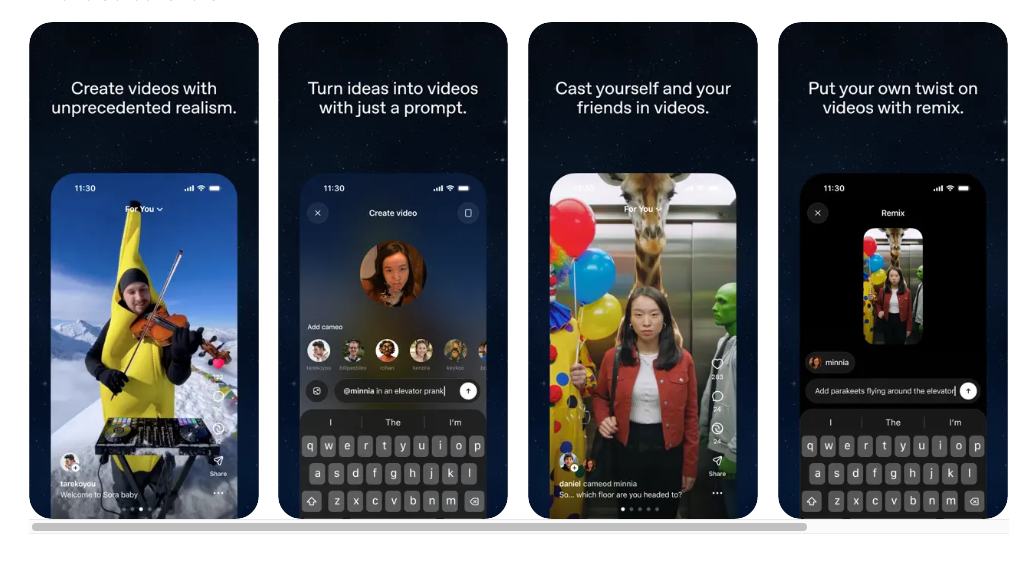
OpenAI’s Sora 2 is a new AI-powered app that lets you create videos with synchronized audio, realistic physics, and even insert yourself into scenes using Cameos. Here’s a step-by-step guide for beginners to make the most of it.
📲 Step 1: Download & Sign In
- Download the Sora iOS App. (Android not yet supported.)
- Access is gradually rolling out — all ChatGPT Pro users are now eligible.
- Sign in with your OpenAI account. You’ll confirm your birthday for protections.
- Some accounts require an invite code — each user gets 4 codes to share with friends.
- 🌍 If you’re outside the U.S./Canada, try using a VPN with U.S. location to download and explore.
🎥 Step 2: Create Your First Video
- Text-to-Video: Type a description (e.g., “a cat playing basketball in space”) → get a 10-second video with audio.
- Image-to-Video: Animate still photos (not real people yet).
- Remix: Pick an existing post and create your own version, labeled clearly as a remix.
- Mobile vs. Desktop: On phones, Sora creates portrait videos (9:16). On laptops (sora.com), you can also make landscape (16:9).
- Daily Limit: At launch, you can make up to 50 videos per day.
🧑🤝🧑 Step 3: Use Cameos (Your Face + Voice)
Cameos let you cast yourself, friends, or even pets as characters inside Sora videos:
- Opt-in by uploading a short video and audio sample for verification.
- Sora builds a secure digital likeness of your face and voice.
- You control who can use your cameo, revoke access anytime, and delete cameo data if needed.
- ⚡ Pro Tip: For best cameo quality, record in good lighting, clear background, and neutral facial expressions. Speak a few sentences naturally to capture your voice style.
✨ Step 4: Experiment with Prompts
Sora 2 follows instructions closely. To get the best results, keep prompts clear and specific:
- Include: subject, setting, motion, camera style, pacing, and audio type.
- Example: “A 10-second cinematic video of a surfer riding a huge wave at sunset, with ocean sound effects and slow-motion camera.”
- Start small, then iterate — tweak style, motion, or audio as needed.
🛡 Step 5: Stay Safe
- All videos include watermarks + C2PA metadata for transparency.
- Parental controls and teen safety settings are built in.
- Real people’s likeness cannot be uploaded as image-to-video (except Cameos with consent).
💡 Pro Tips for Beginners:
• Keep prompts simple — avoid too many moving parts at once.
• Limit crowd scenes — Sora struggles with multiple people speaking at the same time.
• Use shorter shots before trying long stories.
• Save your best prompts and remix drafts to learn what works.
With Sora 2, creating a video is as simple as describing your idea. Play, experiment, and share — the future of video is in your hands.
The Simplest Way to Create and Launch AI Agents and Apps

You know that AI can help you automate your work, but you just don't know how to get started.
With Lindy, you can build AI agents and apps in minutes simply by describing what you want in plain English.
From inbound lead qualification to AI-powered customer support and full-blown apps, Lindy has hundreds of agents that are ready to work for you 24/7/365.
Stop doing repetitive tasks manually. Let Lindy automate workflows, save time, and grow your business.
🎉 Win a Chance to Get a Sora 2 Invite!
We’re sending out the first lucky draw form for Sora 2 invites to our AI Viewer friends in just a short while. Don’t miss your chance to join the early wave of creators using OpenAI’s latest video AI!
- Keep an eye on your inbox — the form is on its way.
- Fill it out to enter the lucky draw.
- Tomorrow, we’ll go live and pick the winners who get invite codes.
- Not on our email list? Join below to be included.
👉 A special round will also be shared later with our Urdu AI Updates community. Stay tuned!
🎥 What We Learned from the Sora 2 Launch Video
Beyond the written announcement, OpenAI’s official Sora 2 launch video shows why this update is so groundbreaking. Here are the biggest highlights:
- Lifelike body physics: Basketball plays, dance moves, and everyday motion look natural and realistic.
- Synchronized audio: Dialogue matches lip movements, while ambient sound (streets, waves, crowds) creates a cinematic feel.
- Cameo demo: Shows how anyone can upload a short clip and appear inside AI-generated scenes with their face + voice.
- Remix feed: A TikTok-style stream where users instantly remix trending videos, making it a cultural hub for AI creativity.
- Safety focus: Every video carries a visible watermark and tamper-proof metadata, plus cameo consent and parental controls.
- Invite-only rollout: Each new user receives four invite codes to share, driving viral adoption while staying controlled.
- Everyday creators: The video emphasizes that anyone — not just pros — can “make a movie” by writing a simple prompt.
These visuals make it clear that Sora 2 isn’t just a tool — it’s designed to change how everyday people create, share, and participate in video culture.
8 Weeks. Actionable AI Skills. MBA-Style Networking.

The 8-week AI for Business & Finance Certificate Program helps you:
Build AI confidence with role-specific use cases
Learn directly from leaders at top financial firms
Build a lifetime network that continues to open doors long after the program ends
Earn your certificate from Columbia Business School Executive Education—program starts November 10.
🎓 Free Google Professional Courses — AI Viewer Scholarship

Friends, you can now access 11 world-class professional courses from Google completely free — no fees, no credit card required. This offer is brought to you as part of the AI Viewer Scholarship.
These courses are designed to make you job-ready and provide Google-verified certificates recognized by employers worldwide.
- Google Data Analytics Professional Certificate
- Google Project Management Professional Certificate
- Google UX Design Professional Certificate
- Google Cybersecurity Professional Certificate
- Google Digital Marketing & E-commerce Certificate
- Google IT Support Certificate
- Google IT Automation with Python Certificate
- Google Advanced Data Analytics Certificate
- Google Business Intelligence Certificate
- Google AI Essentials Certificate
- Google Prompt Engineering Certificate
📋 How to Apply:
- Visit this form: Google Scholarship Form
- Enter your name, city, and email address.
- Within a few days, you will receive an official invite from Coursera.
- You’ll get one month of free access to all Google courses.
- Complete the course(s) and earn your Google-verified certificates.
Note: The earlier you apply, the sooner you’ll get access. Don’t miss this valuable opportunity to grow your career with globally recognized Google certifications!

